

Integration Components and Architecture
Here, you'll find everything you need to know about the components and architecture of the Power BI integration in our ERP solution.
Components
To use Aptean Equipment BI Connect, you'll need several components working together to enable seamless data analysis and management. All necessary components are listed in the following table:
| Components | Description |
|---|---|
| Microsoft Dynamics 365 Business Central | Microsoft Dynamics 365 Business Central is a cloud-based business solution designed to streamline and integrate various business processes. |
| Azure Data Lake Storage (ADLS) | Azure Data Lake Storage is a cloud-based data storage solution from Microsoft designed for storing and analyzing large volumes of both structured and unstructured data. |
| Azure Synapse Analytics | Azure Synapse Analytics is a Microsoft analytics platform that facilitates the transformation and analysis of diverse data sources. |
| Power BI | Power BI is a cloud-based service for hosting, managing, and sharing reports. |
| Power BI Desktop | Power BI Desktop is a locally installed application that allows you to create reports and dashboards for data analysis. |
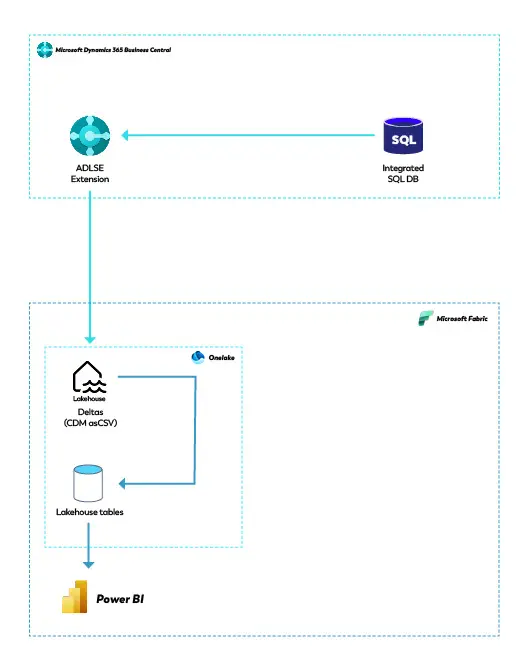
The following section describes the architecture of the Power BI integration.
Architecture