


Absence Integration
TRASER DMS 365 x Dime.Scheduler offers the option of maintaining absences from absence systems/apps other than the Microsoft Dynamics Business Central standard and sending them to Dime.Scheduler. Using a connector app, the Absence Log table can be filled in using a standardized format. The absences are transferred to Dime.Scheduler with the specified information from this table.

This is automatically carried out via a task queue or via the functions for processing one or all entries in the absence log. Entries that have already been submitted to the absence log can be deleted after the specified retention period via the task queue or the function for deleting old entries.
Note
Dime.Scheduler entries will not be deleted.
To be able to use the absence integration functionality, it must first be activated in the Dime.Scheduler FastTrack Wizard. If the Default absence system is selected in the settings, the default absence integration of Dime.Scheduler is used. If connector apps have been installed, additional absence systems can be selected. In addition, you can set the time period for which absences shall be maintained in Dime.Scheduler and how long entries shall be stored in the absence log.
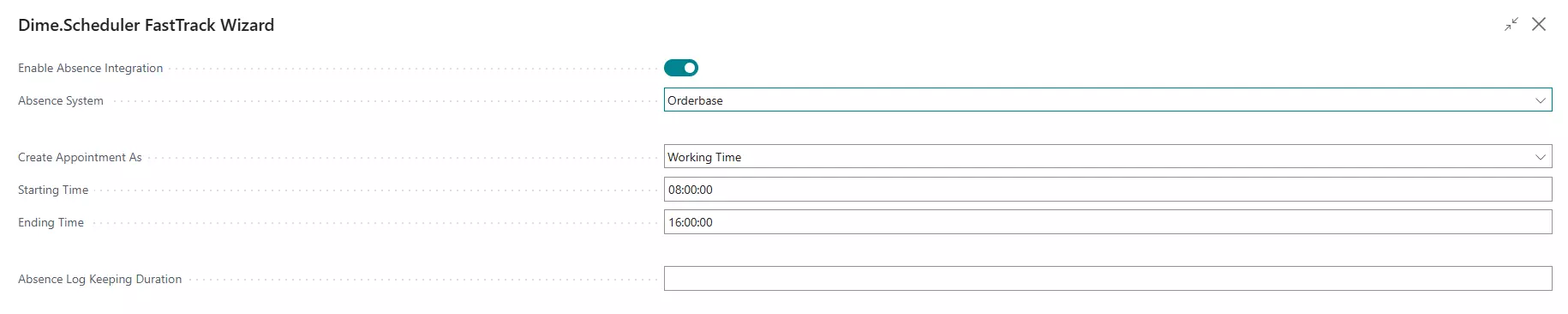
Absence Log Keeping Duration
The Absence Log Keeping Duration field in the Dime.Scheduler setup determines how long entries that have already been transmitted to Dime.Scheduler are retained in the absence log. After this time period expires, the entries are automatically deleted by the task queue or manually via the corresponding function. This helps to reduce the amount of data in the system and to optimize performance. The absences in Dime.Scheduler itself remain unaffected and are not deleted.