


Documentation TRASER Rental 365 x Continia Document Capture
With this app you can improve the workflow between Continia Document Capture and TRASER Rental 365. For this, a function in the area of sub-rent invoices is added which significantly simplifies the daily workflow.
This chapter is divided into the following sections:
Integration into TRASER Role Center
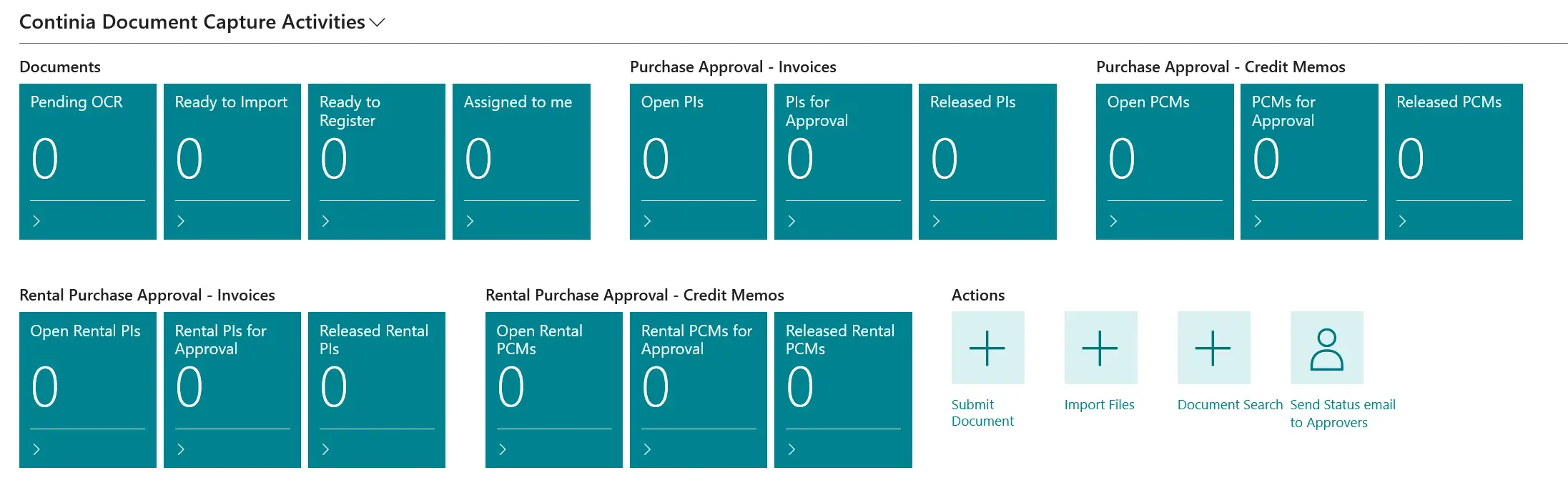
To provide a better overview of the invoices received via Continia Document Capture, we have displayed the invoices related to sub-rents invoices in a new cue.
To create a better workflow, we have added the following additional cues to the Continia Document Capture activities:
Rental Purchase Approval – Invoices
- Open Rental PIs
- Rental PIs for Approval
- Released Rental PIs
Rental Purchase Approval - Credit Memos
- Open Rental PIs
- Rental PIs for Approval
- Released Rental PIs
New Document Category
As part of the implementation of a new document category for sub-rents, it is now possible to receive sub-rent invoices from vendors and process them in Continia Document Capture. This involves reading the contract numbers and automatically transferring the contract contents to the purchase invoice or purchase credit memo.
By default, a new category called Sub-Rent Documents is located under Ready for Registration in the document categories. This category enables the automated capture of incoming documents and the creation of sub-rent invoices, with the process being analogous to the familiar processing of purchase invoices. The functionalities are almost identical to purchase invoice processing.
Automatic Data Recognition
In the document header of the new category's document journal, the Start Date, End Date, and Sub-Rent Contract No. were implemented. These fields are not mandatory. However, if no information regarding the start or end date was extracted from the document, a prompt will be displayed during registration.
Selection of Fitting Sub-Rent Contracts
Based on the selected contract number, Continia Document Capture opens a filtered view which contains all relevant sub-rent contracts of the vendor. The user can choose to either select individual contract lines, deselect lines or to select all. This view serves solely to allocate the document data to the corresponding contract positions.
Automatic Creation of the Sub-Rent Invoice
After the selection was made, the system automatically creates a sub-rent invoice including the related contract lines and the invoice data extracted from the document. The prices have to be added manually at the moment. The automatically created invoice can then be checked, edited, released and posted as usual.